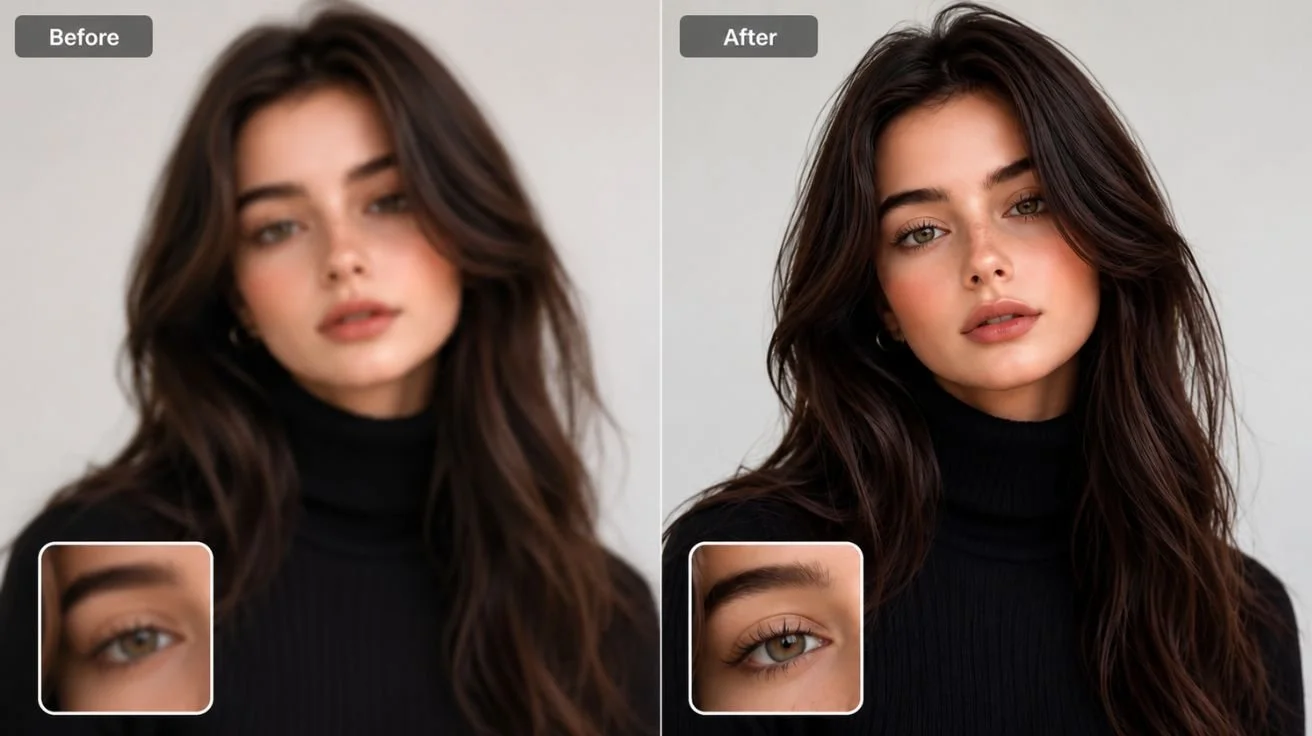

Summary
After personally testing multiple AI-powered editing tools in 2026, I found that modern AI enhancers can dramatically improve blurry images with almost no manual effort. Tools like Leawo Photo Enhancer and Leawo PhotoIns make it possible to sharpen photos, restore facial details, reduce noise, and improve overall image quality without the steep learning curve of traditional editing software like Photoshop.
1. Quick Answer: Can AI Fix Blurry Photos?
Direct Answer
Yes — AI can absolutely help fix blurry photos, especially when the blur is caused by slight motion, poor focus, low lighting, or image compression. During my own testing, I was surprised by how much detail modern AI tools could recover automatically.
A few years ago, sharpening blurry images required advanced editing knowledge and a lot of manual tweaking inside Photoshop. In 2026, however, the best AI photo enhancer tools can process an image in seconds with one-click automation.
That said, AI still has limitations.
What AI Can Improve
From my experience testing these tools, AI works extremely well for:
- Mild to moderate blur correction
- Facial detail restoration
- Sharpening edges
- Improving low-light images
- Enhancing textures and clarity
- Noise reduction
- Correcting washed-out colors
- Restoring old photos
Some AI models are especially good at portraits, while others perform better for landscapes and scenery.
What AI Cannot Fully Recover
Even the best AI photo enhancer 2026 software cannot magically recreate information that simply doesn’t exist.
In my testing, AI struggled with:
- Extremely pixelated images
- Heavy motion blur
- Completely out-of-focus photos
- Severely compressed screenshots
- Missing facial features
AI enhancement works best when there is still some recoverable detail left in the image.
2. Key Features to Look for in an AI Blurry Photo Enhancer
After trying many tools myself, I realized that not all AI enhancers are equally useful. Some focus too heavily on filters while others genuinely improve image quality.
Here are the most important features I now look for whenever testing a blurry photo enhancer.
One-Click Automatic Enhancement
The biggest advantage of AI software is convenience.
I personally prefer tools that can automatically analyze an image and apply:
- Smart sharpening
- Noise reduction
- Exposure correction
- Color optimization
- Detail enhancement
without requiring manual adjustments.
This is one reason I enjoyed using Leawo Photo Enhancer and similar desktop-focused applications.
AI-Driven Smart Sharpening
Basic sharpening filters often create ugly halos and artificial textures.
Good AI tools intelligently rebuild edges and preserve realistic details instead of oversharpening the image.
During testing, I found that modern AI sharpening feels far more natural than traditional editing filters.
Beginner-Friendly Interface
One thing I strongly appreciate is intuitive design.
I don’t always want to spend 30 minutes adjusting sliders manually. The best tools allow users to improve photos quickly without technical expertise.
This is where many AI editors outperform Photoshop for casual users.
Batch Processing Support
When working with dozens or hundreds of images, batch enhancement becomes essential.
I tested several tools on large photo collections, and batch processing saved an incredible amount of time.
This feature is especially useful for:
- Wedding photographers
- Content creators
- E-commerce sellers
- Social media managers
High-Resolution Output
Some free online enhancers reduce image quality during export.
The better AI tools preserve high-resolution output suitable for:
- Printing
- Professional portfolios
- Wallpapers
- Commercial use
Windows and Mac Compatibility
I personally prefer desktop applications because they usually provide:
- Better privacy
- Faster processing
- More stable performance
- No upload limitations
Cross-platform support for Windows and Mac is another major advantage.
3. Quick Comparison Table of the Best AI Photo Enhancer
| Tool | Ease of Use | Blur Reduction | Face Detail Recovery | Batch Processing | Privacy | Free Trial | Platform | Limitation |
|---|---|---|---|---|---|---|---|---|
| Leawo PhotoIns | Excellent | Excellent | Excellent | Yes | High | Yes | Windows/Mac | Desktop install required |
| Remini | Very Easy | Excellent | Excellent | Limited | Medium | Yes | Mobile/Web | Subscription-heavy |
| PicWish | Easy | Good | Good | Yes | Medium | Yes | Web/Desktop | Internet required |
| Picsart | Easy | Moderate | Good | Limited | Medium | Yes | Mobile/Web | Ads in free version |
| Artguru | Easy | Moderate | Moderate | No | Medium | Yes | Web | Limited control |
| Fotor | Easy | Good | Good | Limited | Medium | Yes | Web/Desktop | Export restrictions |
| Pro Photo Studio AI | Moderate | Very Good | Excellent | Yes | Medium | Yes | Web | Premium pricing |
| Topaz Photo AI | Advanced | Outstanding | Outstanding | Yes | High | Yes | Windows/Mac | Expensive |
| Let’s Enhance | Easy | Good | Moderate | Yes | Medium | Yes | Web | Credit-based pricing |
| ImgGen AI | Easy | Good | Good | Limited | Medium | Yes | Web | Slower processing |
4. Best AI Tools to Enhance Blurry Photos in 2026
1. Leawo PhotoIns
Brief Introduction
After extensive testing, Leawo PhotoIns became one of my favorite tools overall. It combines AI enhancement with a beginner-friendly interface while still delivering impressive detail restoration.
Pros
- Excellent automatic enhancement
- Strong facial detail recovery
- Great noise reduction
- Simple workflow
- High-resolution export
- Desktop-based privacy protection
Cons
- Fewer advanced manual controls
- Requires local installation
Personal Experience
I tested several portrait and travel photos using Leawo PhotoIns, including some low-light smartphone images that looked nearly unusable originally.
The software handled facial sharpening particularly well. Unlike many online AI enhancers that oversoften skin, PhotoIns preserved natural textures while improving clarity.
I also appreciated that my photos stayed local on my computer instead of being uploaded to cloud servers.
Best For
- Beginners
- Family photos
- Portrait enhancement
- Travel photography
- Quick one-click improvements
2. Remini
Brief Introduction
Remini is one of the most recognizable AI enhancement apps today.
Pros
- Excellent facial restoration
- Extremely easy to use
- Fast processing
Cons
- Aggressive subscription prompts
- Limited desktop workflow
- Sometimes oversharpens faces
Personal Experience
In my testing, Remini worked amazingly well for blurry selfies and portrait recovery. However, it occasionally made faces appear overly artificial.
Best For
- Selfies
- Social media photos
- Portrait recovery
3. PicWish
Brief Introduction
PicWish focuses on AI-powered enhancement and background editing.
Pros
- Clean interface
- Decent sharpening
- Supports desktop and web
Cons
- Internet dependency
- Less accurate with complex blur
Personal Experience
I found PicWish reliable for basic enhancement tasks but less impressive for severe blur correction.
Best For
- Casual editing
- Product photography
- Social media images
4. Picsart
Brief Introduction
Picsart combines AI enhancement with creative editing features.
Pros
- All-in-one editing suite
- Mobile-friendly
- Good filters
Cons
- Not specialized for deblurring
- Ads in free version
Personal Experience
While not the strongest deblurring tool I tested, Picsart performed reasonably well for quick fixes and casual improvements.
Best For
- Mobile editing
- Creative projects
- Social media content
5. Artguru
Brief Introduction
Artguru focuses on AI-based artistic enhancement and restoration.
Pros
- Beginner-friendly
- Fast online processing
Cons
- Limited customization
- Weaker detail restoration
Personal Experience
Artguru worked fine for lightly blurry images but struggled with more challenging photos.
Best For
- Simple photo cleanup
- Fast web-based enhancement
6. Fotor
Brief Introduction
Fotor remains a popular online editing platform with AI enhancement tools.
Pros
- Easy to use
- Multiple editing tools
- Cloud-based workflow
Cons
- Export restrictions
- Limited free features
Personal Experience
Fotor provided decent overall results but didn’t match the stronger desktop AI tools in sharpness recovery.
Best For
- Beginners
- Basic enhancement
- Quick online edits
7. Pro Photo Studio AI
Brief Introduction
This tool focuses heavily on professional portrait enhancement.
Pros
- Excellent skin detail recovery
- Advanced AI retouching
- Strong portrait optimization
Cons
- Premium pricing
- More professional-oriented
Personal Experience
Portrait performance was extremely impressive, especially with studio-style images.
Best For
- Professional photographers
- Portrait editing
8. Topaz Photo AI
Brief Introduction
Topaz Photo AI is one of the most advanced AI enhancement platforms available today.
Pros
- Outstanding detail recovery
- Exceptional denoising
- Professional-level quality
Cons
- Expensive
- Requires stronger hardware
Personal Experience
This was arguably the most technically powerful software I tested. It recovered detail from difficult images better than almost any competitor.
However, it may feel overwhelming for beginners.
Best For
- Professionals
- Advanced users
- Serious restoration projects
9. Let’s Enhance
Brief Introduction
Let’s Enhance focuses on AI upscaling and image quality improvement.
Pros
- Good upscaling quality
- Easy workflow
Cons
- Credit-based system
- Limited free usage
Personal Experience
I found it more useful for enlarging images than fully repairing severe blur.
Best For
- Upscaling
- Web graphics
- Print preparation
10. ImgGen AI
Brief Introduction
ImgGen AI offers fast AI enhancement with a lightweight interface.
Pros
- Easy to use
- Simple enhancement tools
Cons
- Slower rendering
- Limited advanced controls
Personal Experience
Good for quick enhancement tasks but less powerful than premium desktop alternatives.
Best For
- Casual users
- Quick edits
5. Conclusion
After personally testing all these tools, I believe Leawo PhotoIns delivers one of the best overall experiences for users looking to fix blurry photos quickly and effectively in 2026.
What impressed me most was its balance between:
- Simplicity
- AI automation
- Natural-looking results
- Privacy protection
- High-quality exports
While tools like Topaz Photo AI may offer deeper professional controls, Leawo Photo Enhancer and PhotoIns provide a far more approachable experience for everyday users who want strong results without complicated editing workflows.
Ultimately, the best AI photo enhancer 2026 depends on your specific needs. Portrait photographers may prioritize facial recovery, while casual users may simply want quick one-click sharpening.
The good news is that modern AI tools make it easier than ever to learn how to enhance a blurry photo without needing advanced editing skills.
6. FAQs
Will AI photo enhancers reduce the quality of my original image?
Most modern AI tools preserve the original image and create a separate enhanced version. However, export quality may vary depending on the software and subscription plan.
Is it safe to upload my private photos to online AI enhancers?
Not always. During my testing, I personally preferred desktop tools like Leawo PhotoIns because they process images locally without requiring uploads to cloud servers.
If privacy matters, desktop software is usually the safer option.
Is AI photo enhancement better than manual sharpening?
For most users, yes.
AI enhancement is significantly faster, easier, and often produces more natural results than manual sharpening filters.
Professionals may still combine AI with manual editing for maximum control.
Can AI recover facial details in blurry portraits?
Yes, especially with mild or moderate blur.
In my testing, portrait-focused AI models performed surprisingly well at restoring:
- Eyes
- Skin texture
- Hair detail
- Facial edges
However, extremely blurry faces remain difficult to recover perfectly.
Can I fix a blurry photo taken in low light or at night?
Yes. Many AI tools now combine:
- Denoising
- Exposure correction
- AI sharpening
to improve low-light images significantly.
Results depend on how much detail remains in the original photo, but modern AI enhancement has become remarkably effective for nighttime photography.
Read More: The Future-Ready Stack Is Built on Security, Insight and Integration


Leave a Comment